
Schemas
Schemas convert a percentage entered on the Gradebook to another value. The main use of schemas at Sheffield Hallam is to create Pass/Fail grades to show to students for those tasks. There are also some areas which display a grade category (e.g. High 2.1) to students, which is also possible with schemas. In those cases where schemas are used for UGD purposes, your local area should be able to give you advice about the schema to use.
Blackboard's guidance on Schemas covers the basics of setting one up. However if you have a pass/fail summative task in SITS, there will be a corresponding Pass/Fail schema set up automatically in the assessment item created in your Blackboard site. For Marks Transfer to work successfully, you must not change that schema, or use a different one for that task. The boundaries of that Pass/Fail scheme look like this:
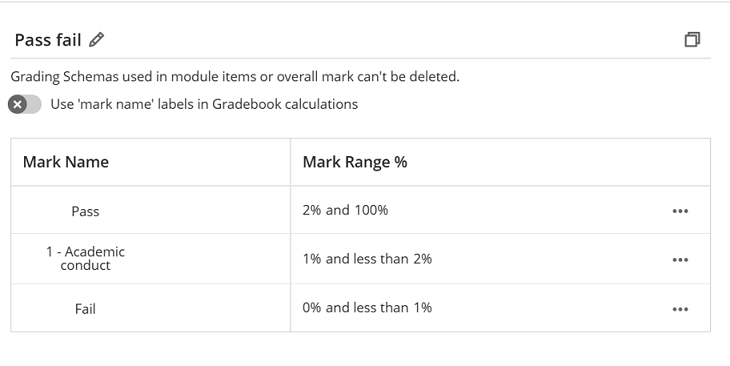
These settings mean that a value of 0 will be converted to the word "Fail" while values of 1 will be converted to "1 - Academic conduct". Values of 2 and greater would be converted to the word "Pass". We recommend inputting 100 for Pass.