
Start of Year Checklist
Before teaching starts, we recommend taking a few minutes to check your modules in Learning Analytics. The checks below can help avoid common attendance and reporting issues at the start of term.
1. Confirm your modules access
Please confirm that you can see all the modules you are teaching on in Learning Analytics.
If a module has not yet started, it may be hidden by the Status filter. If you cannot see an expected module, try adjusting the filter to display inactive modules.
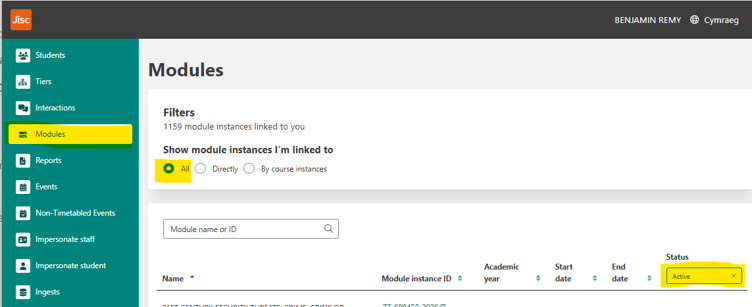
Access to modules in Learning Analytics is based on enrolment in the corresponding Blackboard site. If you cannot see a module you expect to have access to, first check that you are enrolled on the relevant Blackboard site. Once enrolled, the module should become visible in Learning Analytics by the next working day.
2. Check module dates
Review the start and end dates shown for the module in Learning Analytics. If these dates are incorrect, please contact ! SITS Help with the full module code and the correct dates, and ask for them to be updated in SITS.
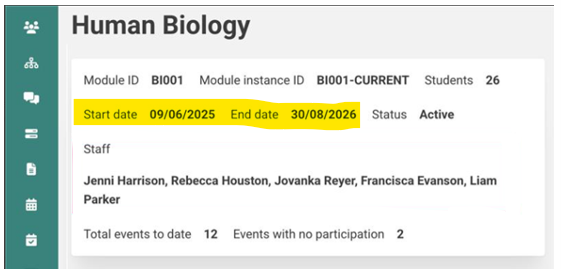
Accurate dates ensure that modules become active in Learning Analytics at the right time. While attendance can still be recorded against inactive modules, it will not contribute to student engagement metrics until the module becomes active.
3. Review events and registers
Timetabled events and the associated student registers are imported into Learning Analytics from the timetabling system up to two weeks in advance. This allows you to review events and retrieve attendance codes in advance.
If an event does not appear in Learning Analytics, first check that the timetable for the module is up to date in MyTimetable.
If the information shown in Learning Analytics does not accurately reflect what is displayed in MyTimetable, please contact the Learning Analytics team and we will investigate.